
The Critical Link: Why MFI Makes Your Ad Layout an SEO Issue
When Google announced its shift to Mobile-First Indexing, most publishers focused on ensuring their content was responsive and their navigation was mobile-friendly. But the implications run much deeper, right down to the ad placements that fund your business.
From Content Parity to Ad Parity
Mobile-First Indexing isn't just about ensuring the text and images on your mobile site match your desktop version. Google's crawlers have evolved. They now render pages much like a real user's browser does, executing JavaScript and evaluating the full user experience. This rendered view includes how your ads are loaded, where they appear, and how they interact with your content.
An ad that loads slowly or causes your text to jump around is no longer just a minor annoyance for a user; it's a direct signal to Google that your page provides a poor experience. In the MFI era, your ad layout is an integral part of your site's technical SEO foundation.
The Three SEO Killers of Poor Mobile Ad Layouts
Poorly optimized mobile ads can cripple your search rankings through three primary mechanisms.
- Core Web Vitals (CWV) Degradation: Core Web Vitals are a set of specific metrics Google uses to measure a page's real-world user experience, and they are a confirmed ranking signal. Ads are one of the most common culprits behind poor CWV scores.
* Largest Contentful Paint (LCP): This measures how long it takes for the largest element (usually an image or block of text) in the viewport to become visible. Heavy, slow-loading ad scripts can block the browser's main thread, delaying your content from rendering and leading to a poor LCP score.
* Cumulative Layout Shift (CLS): This measures the visual stability of a page. If an ad loads without a defined space reserved for it, it will suddenly appear and push your content down the page. This "jumping" effect is a massive mobile user experience problem and a primary cause of high CLS scores.
* First Input Delay (FID): This measures a page's responsiveness to user interaction. If the browser is busy executing heavy ad scripts, it can't respond quickly to a user's tap or click, resulting in a poor FID score.
- The Intrusive Interstitials Penalty: Google actively penalizes mobile pages that show intrusive interstitials. These are ads that obscure the main content and create a frustrating experience, especially for users arriving from search results. This includes pop-ups that cover content, "welcome mat" ads that must be dismissed before accessing the page, or any ad that makes content difficult to access. As Google’s documentation states, these formats make the content "less accessible," leading to a negative ranking signal.
- Page Experience Signals: Core Web Vitals and the absence of intrusive interstitials are key components of Google's broader Page Experience signals. This collection of factors—which also includes mobile-friendliness and HTTPS—is designed to reward sites that users enjoy visiting. A bad ad experience directly signals a low-quality page to Google, which can suppress your ability to rank, especially in competitive niches.
The "Don'ts": Common Mobile Ad Layout Mistakes to Avoid
Before fixing the problems, you have to identify them. Here are the most common mobile ad layout mistakes that publishers make, often without realizing the SEO damage they're causing.
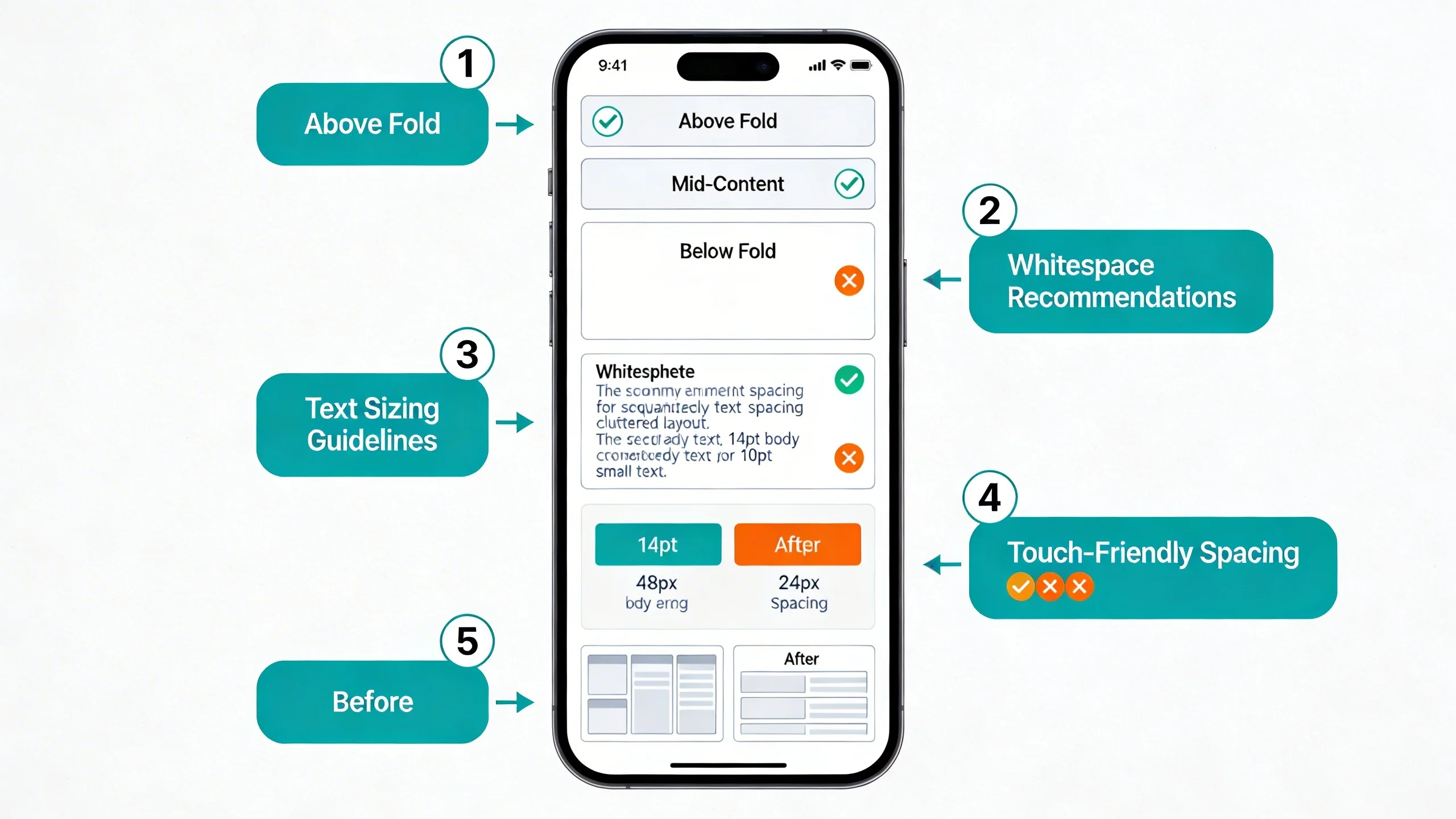
(Visual Suggestion: A diagram showing a smartphone screen with multiple large ads stacked at the top, pushing content below the fold.)
Mistake #1: The Top-Heavy Ad Bomb
This is the classic mistake of placing multiple, large ad units "above the fold" on a mobile screen. The publisher's logic is to maximize visibility, but the result is a terrible user experience. Users arriving from a search result are forced to scroll past a wall of ads just to see the first sentence of the content they came for. This not only frustrates users but also significantly harms your LCP score, as the browser must contend with these heavy elements before rendering your primary content.
Mistake #2: The CLS Nightmare
Cumulative Layout Shift is the silent killer of mobile user experience. This mistake occurs when you implement ad units without reserving a dedicated space for them in your site's code. The page loads, the user starts reading, and then—BAM—the ad suddenly pops into view, pushing the text they were reading down the screen. This is incredibly jarring and is a direct result of failing to define a min-height or aspect-ratio for your ad containers, causing a high CLS score that Google will penalize.
Mistake #3: Ignoring the Better Ads Standards
The Coalition for Better Ads has established clear guidelines on ad formats that are considered unacceptable. Ignoring these is a direct path to penalties. The most common mobile violations include:
- Pop-up ads that block the main content.
- Prestitial ads that appear before the content has loaded, often with a countdown timer.
- Ad density higher than 30% in the main viewport.
- Flashing animated ads that are distracting and disruptive.
- Full-screen scrollover ads that appear as a user scrolls down the page.
Mistake #4: Obtrusive Anchor & Vignette Ads
Anchor (or sticky) ads that cling to the bottom of the screen can be effective, but they become a problem when implemented incorrectly. An anchor ad that is too tall—taking up more than 15-20% of the screen height—is obtrusive and can violate ad standards. Similarly, vignette ads (full-screen ads that appear between page loads) become problematic if they appear too frequently, show up when a user first lands on the site, or have a close button that is difficult to find or tap.
Mistake #5: Synchronous Ad Loading
This is a technical but critical mistake. If you place your ad scripts in the <head> section of your HTML without the async or defer attributes, you are telling the browser to stop everything, fetch and execute the ad script, and only then continue rendering your page content. This is called synchronous loading, and it's a primary cause of slow page load times and a poor LCP score.
The "Do's": Actionable Strategies for SEO-Friendly Mobile Ad Layouts
Now that you know what to avoid, let's focus on the actionable strategies to create a mobile ad layout that is fast, stable, compliant, and profitable.
Strategy 1: Build a Stable Foundation with Defined Ad Slots
The single most important thing you can do to combat CLS caused by ads is to reserve space for every ad unit. When the browser renders your page, it should know exactly how much vertical space to leave for an ad, even before the ad itself has loaded.
This prevents the content "jump" that infuriates users and Google.
- Use CSS
min-height: The simplest method is to wrap your ad tag in a<div>and apply a minimum height to it. If you know you are serving a 300x250 ad, you can set a minimum height for its container.
Example Code Snippet:
```css
.ad-slot-300x250 {
display: block;
min-height: 250px;
background-color: #f0f0f0; / Optional: placeholder color /
}
```
- Leverage
aspect-ratio: For responsive ad units where the height might change with the screen width, the modern CSSaspect-ratioproperty is a lifesaver. It allows the browser to calculate the correct height based on the width, perfectly reserving space.
Example Code Snippet:
```css
.responsive-ad-container {
aspect-ratio: 300 / 250; / width / height /
}
```
Strategy 2: Prioritize Content with Smart Loading Techniques
Your content should always load before your ads. A user came to your site to read your article, not to wait for an ad to render. Smart loading techniques ensure your content gets priority.
- Lazy Loading: This is the practice of deferring the loading of off-screen resources until a user scrolls near them. It is absolutely crucial for any ad unit that is not in the initial viewport (i.e., "below the fold").
* Benefits: It dramatically improves initial page load speed (LCP), reduces initial data usage for the user, and ensures that browser resources are focused on rendering the content the user can see first.
* Implementation: Many modern ad networks and header bidding wrappers have lazy loading built-in. You can also use JavaScript-based solutions or, for ads delivered in iframes, the native loading="lazy" attribute.
- Asynchronous Loading: As mentioned in the "Don'ts," never load ad scripts synchronously. Always use the
asyncattribute on your script tags. This tells the browser to download the script in the background without stopping the rendering of your page content.
Example: <script async src="https://.../ad-script.js"></script>
Strategy 3: Master Strategic & Compliant Ad Placement
Where you place your ads is just as important as how you load them. The goal is to integrate ads naturally without disrupting the reading experience.
- The First Viewport (Above the Fold): The golden rule here is one ad unit, maximum. This ad should not dominate the screen. A 300x250 unit or a responsive horizontal banner (e.g., 320x50 or 320x100) placed below your site logo and title is often a good balance. The user should be able to see your headline and the beginning of your content without scrolling.
- In-Content Ads: To avoid overwhelming the reader, follow this rule of thumb: place the first in-content ad after the 2nd or 3rd paragraph. This gives the user time to engage with your content before seeing an ad. Space subsequent ads every 3-4 paragraphs or after approximately 250-300 words of text. Always place ads at natural breaks in the content, such as after a paragraph or a subheading, never in the middle of a sentence.
- The "Smart" Anchor Ad: A sticky ad at the bottom of the screen can provide high viewability without being overly intrusive if done correctly.
* It must be easily dismissible with a clear "close" button.
* It must not cover an excessive portion of the screen (keep it under 15% of the viewport height).
* Fortunately, major platforms like Google AdSense have compliant anchor ad formats built-in that handle these rules for you.
- Using Vignette Ads Properly: These full-screen ads can be high-earning but must be used with care. They should only appear between page loads—for example, when a user clicks a link to navigate to another page on your site. They should never appear when a user first arrives on your site or when they click the "back" button. They must also be easily and immediately skippable.
- Image-Adjacent Ads: Placing a 300x250 ad next to an image can be effective, as a user's attention is naturally drawn to visual elements. However, you must test this carefully on various screen sizes to ensure it doesn't cause awkward text wrapping or push content out of view.
Strategy 4: Optimize Your Ad Stack for Speed
The technology delivering your ads has a direct impact on your site's performance.
- Ad Network Selection: Not all ad networks are created equal. Some have lighter, faster ad tags than others. If your site is slow, it may be worth auditing the performance impact of each network you work with.
- Header Bidding: For publishers using header bidding to increase competition, performance is key. Opt for a lightweight header bidding setup or a server-to-server (S2S) solution, which moves the heavy lifting of the ad auction off the user's browser and onto a server, reducing latency.
- Limit Ad Refresh: Some publishers refresh ad units while a user is on the page to increase impressions. If done too aggressively, this can constantly consume browser resources, slowing down the page and creating a poor experience. Use ad refreshing sparingly and only on highly engaged sessions.
Tools and Testing: How to Audit Your Mobile Ad Layout
Don't guess—test. Use these tools to diagnose exactly how your ads are impacting your site's SEO health.
- Google PageSpeed Insights (PSI): This is your number one tool. Run your key mobile pages through PSI and pay close attention to the Core Web Vitals scores. In the "Diagnostics" section, look for opportunities to "Reduce the impact of third-party code." PSI will often directly identify slow ad scripts that are delaying your page load. It will also explicitly flag any elements causing CLS.
(Visual Suggestion: An annotated screenshot of a PSI report highlighting a large CLS score and a slow third-party ad script in the diagnostics.)
- Google Search Console (GSC): Your GSC account is a goldmine of data. Navigate to the "Core Web Vitals" report under the "Experience" tab. It will group your URLs into "Poor," "Needs Improvement," and "Good." Click into the "Poor" report to see which specific URLs are failing and why (e.g., "CLS issue: more than 0.1"). This helps you prioritize your optimization efforts.
- Chrome DevTools (for advanced users): For real-time debugging, open DevTools in your Chrome browser (F12 or right-click > Inspect). Go to the "Rendering" tab and check the "Layout Shift Regions" box. Now, as you reload your page, any element that shifts will be briefly highlighted in blue, allowing you to pinpoint exactly which ad slot is causing CLS.
- The Ad Experience Report: Also located within Google Search Console, this report will explicitly tell you if your site is violating any of the Better Ads Standards. If you have any intrusive ad experiences, Google will flag them here.
Conclusion
In the era of Mobile-First Indexing, a successful monetization strategy is inseparable from a positive user experience. Your mobile ad layout is no longer just about revenue; it's a fundamental component of your technical SEO. The days of cluttering mobile pages with slow, intrusive ads are over—Google is actively rewarding sites that prioritize the user.
By shifting your mindset, you’ll see that SEO and ad revenue are not opposing forces. They are symbiotic. By optimizing for the user with fast, stable, and non-intrusive ads, you are simultaneously optimizing for Google's ranking algorithms. A stable layout improves CLS, smart loading improves LCP, and respectful placement improves the overall Page Experience. These are the signals that build long-term rankings and user trust.
Start by auditing your highest-traffic mobile page today using PageSpeed Insights. Fixing just one CLS-causing ad can have a significant impact on your rankings and user trust.
---
Frequently Asked Questions (FAQ)
Q1: How many ads are too many on a mobile page?
A: There's no magic number, but focus on ad density. The Coalition for Better Ads flags pages with more than 30% ad density in the main viewport. A better approach is to focus on user experience; if the page feels cluttered with ads or is difficult to read, you probably have too many. Prioritize clean, well-spaced layouts over cramming in one more ad unit.
Q2: Can I just use Google AdSense Auto Ads?
A: Auto Ads have improved significantly and can be a good starting point. They are generally good at compliance with standards for vignette and anchor ads. However, you relinquish control over exact placements. This can sometimes lead to ads being inserted in locations that cause minor layout shifts or disrupt the natural flow of your content. If you use Auto Ads, it's essential to test and closely monitor your Core Web Vitals reports in Google Search Console to catch any issues.
Q3: Will optimizing my ad layout instantly improve my SEO rankings?
A: It can have a significant positive impact, especially if your site currently has poor Core Web Vitals scores. Fixing major user experience issues like high CLS or a slow LCP sends strong positive signals to Google that your site provides a better experience, which is a confirmed ranking factor. However, ranking improvements are typically gradual and part of a holistic SEO strategy. Think of it as removing a roadblock: it doesn't guarantee you'll win the race, but it ensures you're no longer running with the emergency brake on.