

What Exactly is Ad Viewability? The Foundation for Higher Revenue
Before we can improve viewability, we need a crystal-clear understanding of what it means. It’s not a vague concept; it's a specific, measurable standard that defines the new currency of the digital ad ecosystem: the viewable impression.
The Official Definition: Meeting the MRC and IAB Standard
The standard for ad viewability is set by the Media Rating Council (MRC) in partnership with the Interactive Advertising Bureau (IAB). It provides a clear, universal definition that buyers and sellers can agree on.
For display ads, the official standard is:
- 50% of the ad's pixels must be in view on the user's screen for at least 1 continuous second.
For video ads, the requirement is slightly different:
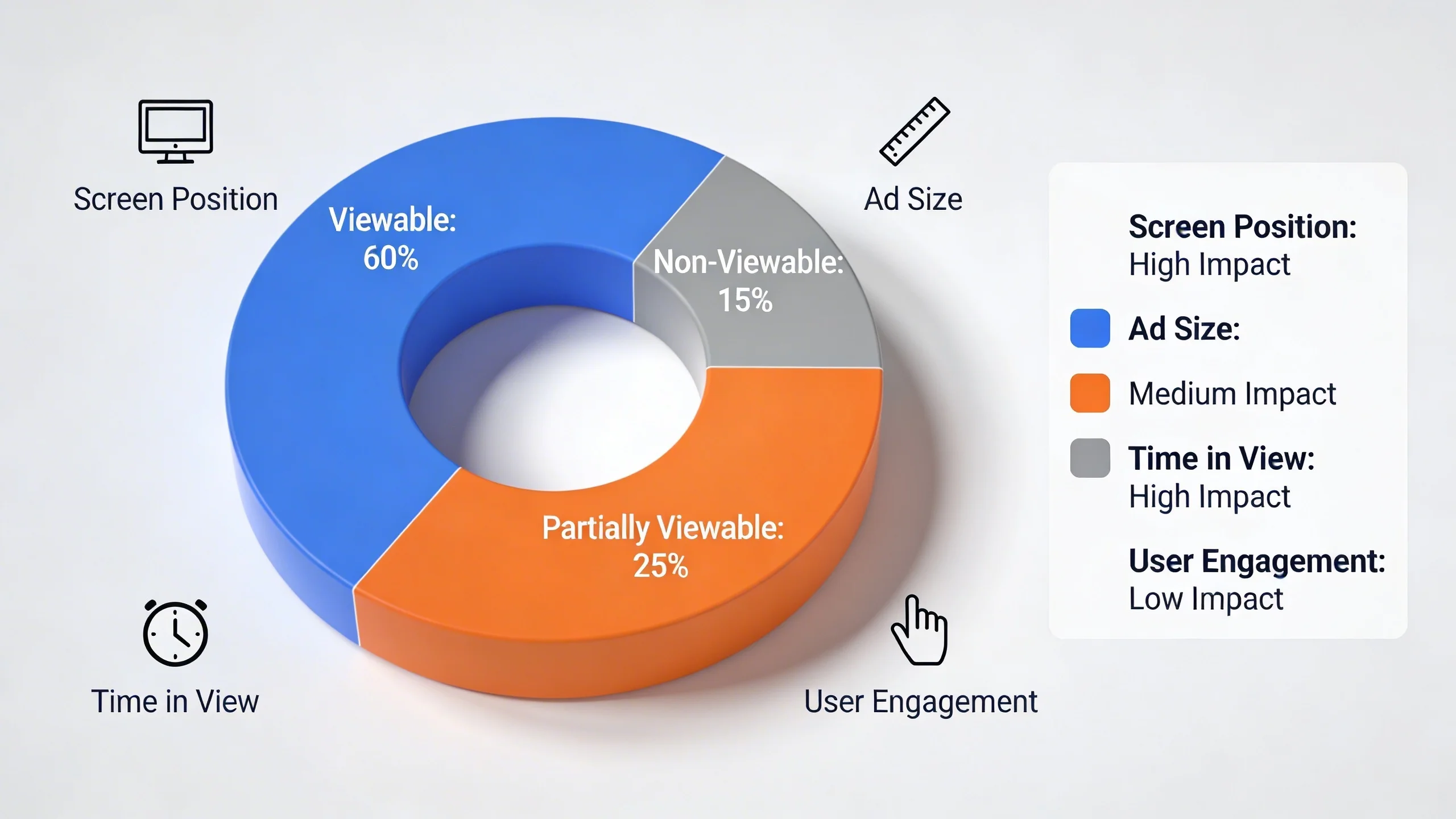
- 50% of the ad's pixels must be in view on the screen for at least 2 continuous seconds.
![A simple graphic illustrating the 50% of pixels in-view rule for a display ad on a screen.]
This means an ad that loads at the bottom of a page but is never scrolled to, or an ad that a user scrolls past in less than a second, does not count as a viewable impression—even though it was served.
Viewability vs. Served Impressions vs. Clicks: Clearing the Confusion
It's crucial to distinguish viewability from other common metrics.
- Served Impression: This is the old way. It simply means the ad server received a request from the user's browser and delivered the ad creative. It gives no information about whether the ad was actually seen. Think of it as a letter being delivered to a mailbox—you don't know if anyone opened it.
- Viewable Impression: This is the new currency. It confirms that the ad was delivered and met the MRC standard for having an opportunity to be seen. This is the letter being taken out of the mailbox and looked at. It's the metric that brand advertisers now use to measure campaign effectiveness and make purchasing decisions.
- Click: This measures a direct user interaction. While valuable, clicks are rare events. Most brand advertising campaigns are focused on awareness, not direct response. Viewability is a prerequisite for a click (a user can't click what they can't see)
and is a far more scalable and meaningful metric for measuring the success of brand campaigns.
Why This Metric is a Game-Changer for Publishers (Not Just Advertisers)
It's easy to see ad viewability as just another demand from advertisers. However, savvy publishers understand it's a massive opportunity. High ad viewability is a signal of a high-quality, premium website. When you can prove your ad inventory is consistently seen by users, it becomes more valuable. This attracts premium advertisers, drives up bids in programmatic auctions, and ultimately leads to significantly higher CPMs and more revenue.
The "Why": How Strong Ad Viewability Directly Impacts Your Bottom Line
Focusing on viewability isn't just about checking a box; it's a core business strategy that directly fuels revenue growth and long-term success. Here’s how.
The Shift to a Viewable Marketplace
The digital advertising ecosystem has already made the switch. Major demand-side platforms (DSPs) like Google's DV360 and The Trade Desk, which represent billions of dollars in ad spend, use viewability as a primary filtering mechanism. Advertisers can set campaign goals to only bid on inventory that meets a certain viewability threshold (e.g., 70% or higher). If your site's ad units have low viewability scores, your inventory becomes invisible to these high-paying buyers before the auction even begins. You are effectively filtered out of the premium marketplace.
The Direct Link: Higher Viewability = Higher CPMs
High-viewability ad inventory is a scarce and valuable resource. Because so many publishers struggle with it, those who can consistently deliver high scores stand out. This scarcity creates increased demand from advertisers who are willing to pay a premium for guaranteed exposure.
The data backs this up: publishers with site-wide viewability of 70% or higher can see CPMs up to two times higher than those with scores below 50%. By improving your viewability, you are fundamentally increasing the value of every ad slot on your website.
Building Trust and Stronger Advertiser Relationships
In a world of ad fraud and murky supply chains, viewability is a proxy for trust. A high viewability score demonstrates a commitment to advertiser performance and transparency. It shows that you run a quality site that values both the user experience and your partners' marketing goals. This reputation is invaluable for securing lucrative direct deals and building the long-term, stable relationships that are the bedrock of a healthy ad monetization strategy.
The Surprising Benefit: A Better User Experience
Here's the secret: optimizing for ad viewability often means optimizing for user experience. A website designed to keep ads in view is typically:
- Faster: Pages load quickly so ads can render before a user scrolls past.
- Less Cluttered: A focus on fewer, high-performing ad slots creates a cleaner, more professional layout.
- More Engaging: The content is so good that users stick around, naturally increasing the time ads are in view.
This creates a virtuous cycle: a better user experience leads to longer session durations, which increases viewability, which drives higher revenue, which allows you to invest in even better content and user experience.
How to Measure Ad Viewability: You Can't Improve What You Don't Measure
Before you can start optimizing, you need a baseline. Fortunately, measuring viewability is more straightforward than ever.
Your Primary Tool: Google Ad Manager's Active View
For most publishers, the starting point is Google Ad Manager (GAM). Google has its own MRC-accredited measurement technology called Active View, which is built directly into GAM ad tags.
You can find your viewability data by running a report in GAM. Navigate to Reporting > Reports > New Report. Select the "Historical" report type. As your dimensions, choose "Ad unit" to see performance by placement. As your metrics, search for and add the following from the "Active View" group:
- Active View measurable impressions: The total number of impressions that were able to be measured by Active View.
- Active View viewable impressions: The number of measurable impressions that were deemed viewable according to the MRC standard.
- Active View viewable %: This is your key metric. It is (Viewable Impressions / Measurable Impressions) x 100.
Run this report to see which ad units are performing well and which are dragging down your average.
Third-Party Verification Partners (The Big Three)
While GAM's Active View is your internal tool, advertisers often use their own third-party verification partners to measure viewability from their side. The three main players in this space are:
- Integral Ad Science (IAS)
- DoubleVerify (DV)
- Moat (now part of Oracle Advertising)
It's common to see slight discrepancies (typically 5-10%) between your Active View numbers and a partner's report. This is usually due to different measurement methodologies. The key isn't to make the numbers match perfectly but to monitor the trends. If your internal numbers are improving, their numbers should be as well.
What's a "Good" Ad Viewability Score? Setting Benchmarks
With your report in hand, you need to know what to aim for. Here are some general industry benchmarks:
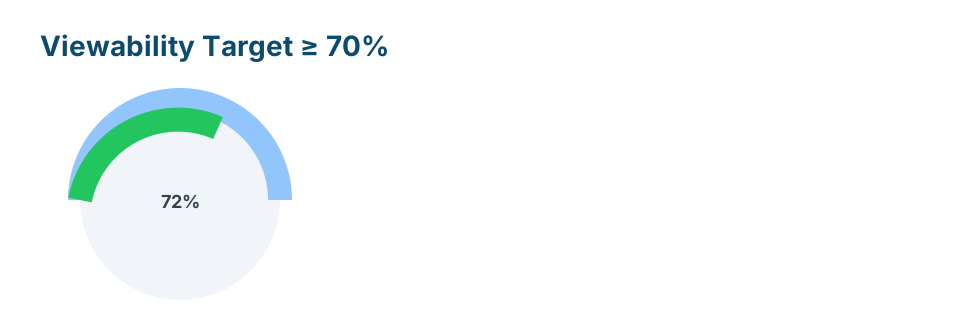
- 70% or higher: This is considered excellent and will make your inventory highly attractive to premium buyers. This should be your goal.
- 50% - 69%: This is an average range. There is significant room for improvement and a clear opportunity to increase revenue.
- Below 50%: This is a red flag. A score in this range indicates that you are likely being filtered out by many programmatic buyers and are leaving significant money on the table. This requires immediate attention.
[Secondary CTA] Download our free checklist: The 10-Point Ad Viewability Health Check for Publishers.
10 Actionable Strategies to Dramatically Improve Ad Viewability
Now for the most important part: the specific, actionable strategies you can implement to boost your viewability score and unlock higher revenue.
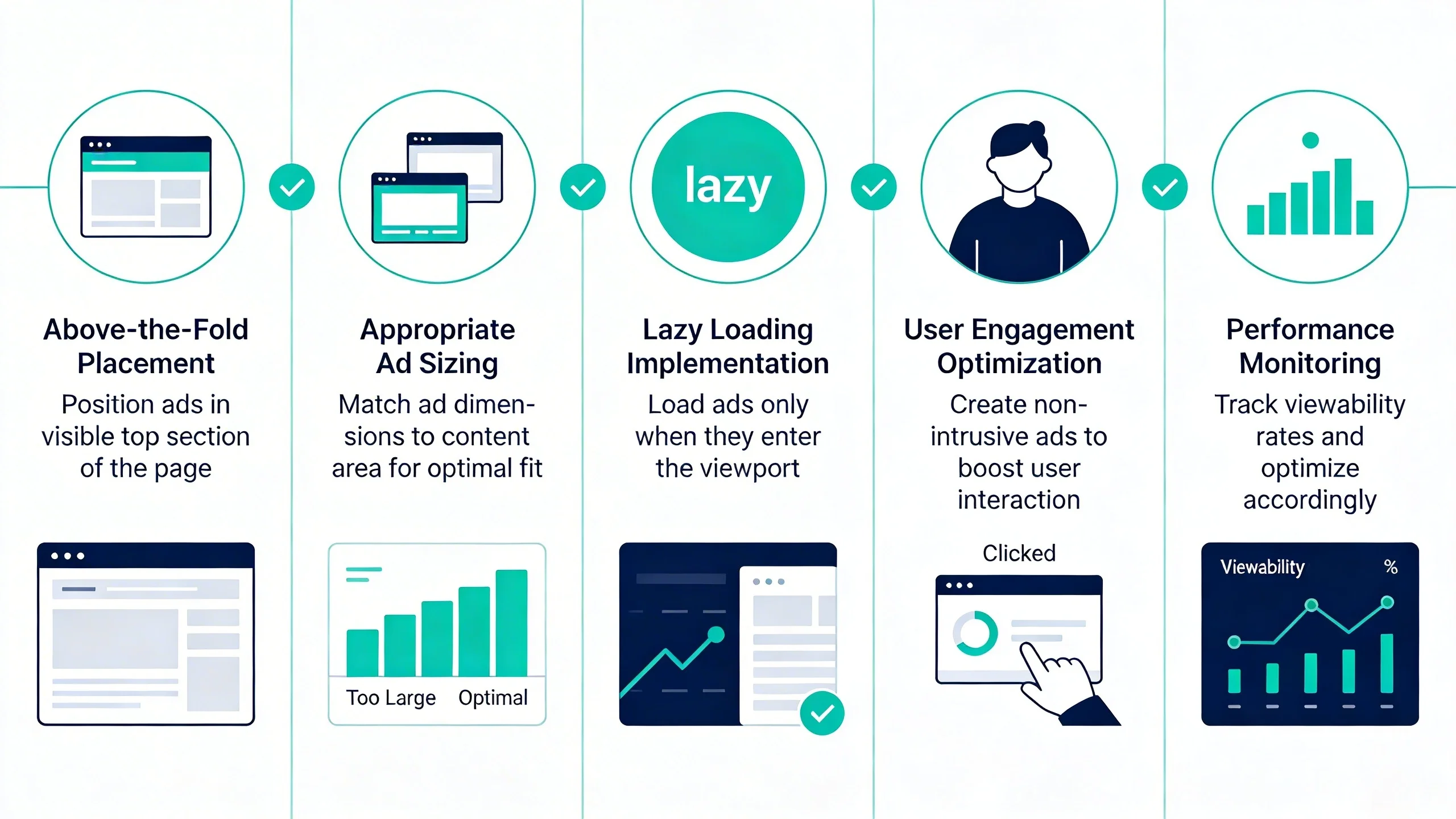
1. Master Ad Placement: Beyond "Above the Fold"
The old advice was to place all ads "above the fold" (ATF). This is outdated. Data shows users often scroll so quickly that ATF ads are missed. Instead, focus on the "viewable fold"—the area where users actually spend their time.
- Place your first ad unit just below the main navigation and above the start of your article content. This spot has extremely high viewability.
- For long articles, place ad units within the content, ideally after the 3rd or 4th paragraph, where users naturally pause to read.
2. Implement Sticky / Anchor Ads (The Right Way)
Sticky ads (or anchor ads) are units that "stick" to the top, bottom, or sidebar of the screen as the user scrolls. They consistently deliver 90%+ viewability. However, they must be implemented correctly:
- Best Practice: Use a sticky sidebar ad (e.g., a 300x600 unit) on desktop and a small anchor ad at the bottom of the screen on mobile.
- Crucial: Ensure they have a clear and obvious "close" button and never cover your content or navigation, as this violates the Coalition for Better Ads standards.
3. Prioritize Blazing-Fast Site Speed
There is a direct correlation between page load speed and viewability. If your page loads slowly, users will scroll down past ad slots before the ad creative has a chance to render and be seen. Improving your site speed is one of the most effective ways to improve viewability. Focus on your Core Web Vitals (LCP, FID, CLS)—a fast site is a viewable site.
4. Embrace Smart Lazy Loading
Lazy loading is the practice of delaying the loading of an ad until it is about to enter the user's viewport. This is a critical technique with a powerful one-two punch:
- It dramatically improves initial page load speed by not loading unseen ads.
- It ensures that almost every ad impression that is counted has a high probability of being viewable, boosting your overall percentage.
5. Optimize Your Ad Sizes
Not all ad sizes are created equal when it comes to viewability. Vertically-oriented ad units stay in the viewport for a longer duration as a user scrolls, giving them more time to meet the 1-second requirement.
- Do: Prioritize sizes like the 300x600 "half page" and the 160x600 "skyscraper."
- Don't: Avoid placing wide, horizontal leaderboards (like the 728x90) in the middle of your content, as users scroll past them almost instantly.
6. Design for a Mobile-First World
Over half of all web traffic is mobile, where viewability presents unique challenges due to smaller screens and faster scrolling behavior.
- Use responsive ad units that automatically adapt to different screen sizes.
- Test your ad layout specifically on various mobile devices. A sticky anchor ad at the bottom of the screen is often the highest-performing mobile ad unit.
7. Implement an Intelligent Ad Refresh Strategy
Ad refresh can increase your impression count, but a naive implementation can kill your viewability. A simple time-based refresh (e.g., refreshing an ad every 30 seconds) will serve new ads even if the user is inactive or has scrolled the ad out of view.
Instead, use a viewable refresh (or "active refresh"). This strategy uses triggers to refresh an ad unit with a new ad only when the original ad has been in view for a certain time and the user is still active on the page.
8. Reduce Ad Clutter and Improve Ad-to-Content Ratio
More is not better. A page cluttered with 10 ad units that have 20% viewability is far less valuable than a page with 4 ad units that have 80% viewability. Ad clutter slows down your site and creates "banner blindness" in users. Focus on fewer, better-placed, high-viewability ad slots. For most content pages, 3-5 ad units is a good maximum.
9. Engage Your Audience with Compelling Content
This may sound simple, but it's fundamental. The longer a user stays on your page and engages with your content, the more time your ads have to be viewed. High-quality content, strong internal linking to keep users on your site, and engaging formats like video and infographics are all powerful viewability tools.
10. Partner with a Monetization Expert
Implementing all of these strategies—lazy loading, ad refresh, placement optimization, A/B testing—can be complex and time-consuming. A managed ad operations partner can provide the advanced technology (like a pre-configured GAM setup and a smart ad wrapper) and the dedicated expertise to optimize all of these factors for you, ensuring you're maximizing viewability and revenue without the technical headache.
Common Mistakes That Are Killing Your Viewability Score
While implementing the strategies above, be sure to avoid these common pitfalls that can instantly tank your scores.
- Hidden Ad Stacking: A fraudulent practice where multiple ads are placed in the same slot on top of each other. Only the top ad is visible, but all register an impression. This will get you blacklisted by demand partners.
- 1x1 Pixel Tracking: An old, deceptive technique of serving an ad in a 1x1 pixel. It's invisible to the user and is considered a form of ad fraud.
- Ignoring Your Mobile Site's Performance: Many publishers optimize their desktop site and assume the changes will carry over to mobile. You must analyze and optimize your mobile layout independently.
- Auto-Playing Video with Sound: This is one of the fastest ways to make a user hit the "back" button. It creates a terrible user experience and kills the viewability for every single ad on the page as the user flees.
Conclusion: From Served to Seen
Ad viewability is no longer a niche metric for ad ops specialists; it is a direct indicator of your inventory's quality, your site's user experience, and your ultimate revenue potential. The entire digital ad industry has moved its currency from "served" impressions to "viewable" impressions, and publishers who fail to adapt will be left behind.
The path to higher ad revenue runs directly through a better, more viewable user experience. It requires a strategic approach to page speed, ad placement, and content engagement. By moving from a "served" to a "viewed" impression mindset and implementing the strategies outlined in this guide, you can take back control of your ad inventory's value, build stronger advertiser relationships, and create a more sustainable monetization future.
---
Ready to see how your viewability score stacks up? Schedule a free, no-obligation viewability audit with our experts today and get a personalized action plan to boost your ad revenue.